
Illustrated archer overlooking a misty mountain city
BUILT FOR CLASSIC CONQUER

Your adventure.
A sharper edge.

Less repetition. More of the game you love.
Thoughtful automation, made for the world
of Classic Conquer.

Archer hunting • One PC, multiple clients • Windows
ARCHER COVER ILLUSTRATION
THE CLASSIC WORLD. A NEW WAY TO PLAY.↓CRAFTED FOR YOUR DAILY ADVENTURE
THE TOOLKIT

Small details.
A bigger difference.

From your first hunt to your last bag of loot,
keep the everyday tasks under control.

01 / ARCHER HUNTING

Let every
arrow count.

Hunt with adaptive movement, configurable zones, and Scatter and flight controls. Follow your session’s progress with kill-rate statistics.

  • Adaptive hunting and zone selection
  • Scatter and flight controls
  • Live kill-rate statistics
Hunting currently supports Archer only.
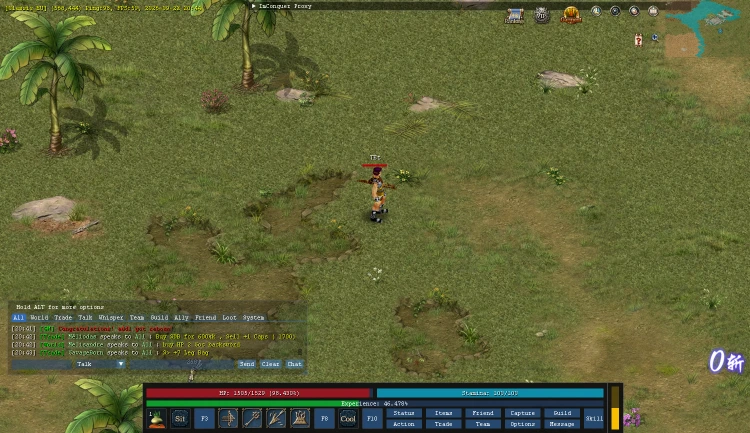
An Archer character inside the Classic Conquer game client
INSIDE THE CLASSIC CLIENT GAMEPLAY CAPTURE
02 / LOOT & INVENTORY

A bag worth bringing home.

Choose what to pick up, illuminate valuable drops, see market values, and pack matching items into scrolls.

Filtered pickup · Drop highlighting · Item packing
03 / HEALTH & EQUIPMENT

Look after your character.

Automatic potions, durability warnings, and repair controls keep maintenance close at hand.

Auto-healing · Durability watch · Repairs
04 / MAPS & MOVEMENT

A world within reach.

Explore world maps, find your route, travel between cities, and follow another character.

World maps · Following · City travel
05 / MINING & TRAINING

Make the quiet hours count.

Keep the ore and gems you choose. Train a skill rotation and rest when stamina runs low.

Mining filters · Skill rotations · Reconnect
06 / ACCOUNTS & CONTROLS

Your setup. Your rhythm.

Manage saved game accounts and multiple local clients, watch event timers, and make every shortcut your own.

Multiple clients · Event timers · Custom hotkeys
07 / CHAT & MESSAGES

Keep the conversation going.

A cleaner chat window and private conversations. Optional AI replies use your own API key.

Private messages · Chat controls · Optional AI
BACK TO THE GAME

Ready in a few
simple steps.

Read the installation guide →
  1. 01

    Make it yours.

    Create your account and activate a subscription with Rewarble credit.

  2. 02

    Choose your folder.

    Download the Windows installer and select your Conquer game folder.

  3. 03

    Connect & adventure.

    Approve this PC with your website account. Open the game and set up your bot.

ONE SIMPLE PACKAGE

All the tools.
Your next 30 days.

No feature tiers to untangle. One prepaid subscription gives you every released feature, on one active PC.

Hunting currently supports Archer only.
AI replies require your own API key.

THE ADVENTURER
$30USD store credit
for 30 days
  • All released features
  • One active PC, multiple local clients
  • Move to another PC whenever you need
  • Prepaid access. No recurring charges.
View package & availability →

Paid with USD Rewarble vouchers.
The voucher seller’s price may differ.

A FEW GOOD QUESTIONS

Before you
set out.

Which game and class does it support?

It is built for the supported Windows client of conqueronline.net. Hunting currently supports Archer only. The installer checks the supported game build before installing.

How do Rewarble payments work?

When checkout is open, buy a USD Rewarble voucher and submit its code here. Confirmed voucher value becomes store credit. Your selected package is purchased when the balance covers it; extra credit stays in your account.

Can I use more than one game client?

Yes. Your subscription supports multiple local game clients on one active PC. It cannot run on two PCs at the same time.

What happens if I change computers?

Approve your new PC, then transfer access from your dashboard. The previous PC stops first; a transfer can take up to 90 seconds.

Does the bot need an internet connection?

Yes. The bot regularly validates your subscription. If validation is unavailable for longer than its device lease, automation pauses until access is restored.